RP_Reformat MJT
Author: Mark Joey Tang - https://www.facebook.com/MJTlab
- http://www.nukepedia.com/gizmos/draw/rp-reformat
- https://m.facebook.com/MJTlab/posts/628051737776651
- http://bit.ly/menupy
- Video: https://youtu.be/vGZ6kNnOcTs
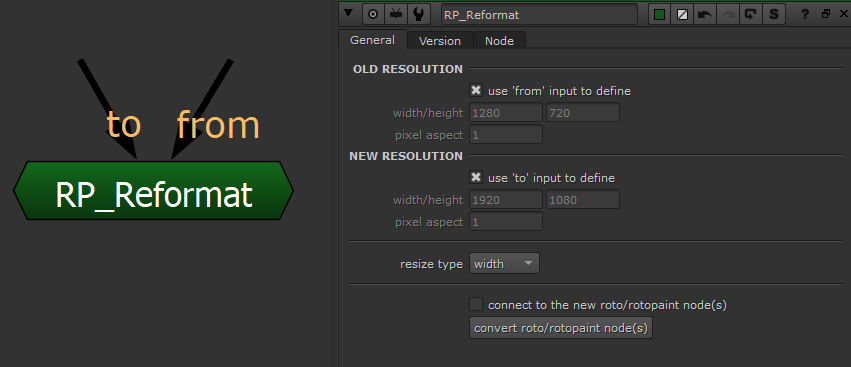
Reformat Roto & RotoPaint node's vector data without resolution issue. Keep the same result on any paint strokes. Support all kinds of splines, brushes and aspect ratio reformat.
How to use:
- Fill in the old resolution of the Roto/RotoPaint was done before.
- Fill in the new resolution.
- Select which type of resize to process (This depends on how the plate was resized)
- Select all the Roto/RotoPaint node(s) Supports multi-select
-
Click 'convert roto/rotopaint node(s)'. Then the new generated node will be placed next to the original node(s) Notes:
-
Entire process will NOT modify the original node
- The resize data will be replaced on individual shape elements:
- Spline: translate, scale, center & feather
- Stroke: translate, scale, center, source translate, brush size, brush space & effect
- Resize process will not touch any data on Layer.